Effects
Each card in the game has one or more effects listed in their effects box. These effects add to or change how the card or the game behaves, in addition to the normal rules associated with that specific card type (or sub-type). Depending on the type of effect, which is indicated by a symbol on the left of the effect text, there can be varied consequences on the game.
Effect Types
There are 4 main effect types in the game, and then each of them can have some variations.
Summoning Cost

The Summoning Cost in a card, if present, must be paid immediately upon summoning. Failing to pay it will fizzle the summon and cause the card to be sent to the graveyard (without triggering "When destroyed" effects). You do not need to pay any costs when setting cards; but when they are flipped they are automatically summoned.
Note that costs denoted by this symbol are the cost for summoning each card; each effect can require its own activation costs specified in the effect text.
See the section "Costs" below for more details on how costs are paid.
Action

Specifies an additional action to be added to this card's Action Pool, meaning that this card can choose perform it during your Event Phases. It can be a simple Action: Strike, which allows this card to Strike regardless of the Event; it can be one of the notable actions listed on the Actions page; or, it can be a unique action described on the card itself.
Continuous

These are continuous, always active effects. They do not ever go to the Stack; as soon as the associated card is summoned, they are considered to be active, and as soon as the associated card is destroyed, they are not.
Trigger


Triggers happen as a response to something. They always start with the word When, and follow standard MTG rules. There is no "missed timing" in Dimensional Rift because that is a stupid concept.
They are added to the stack immediately after its trigger occurs. Some triggers are state checks, and only proc once each time the condition changes from false to true.
Triggers can also be to proc on phase changes (such as, When it's the start of your turn). All such transition triggers for the same phase change are simultaneous.
If multiple triggers proc simultaneously, players can choose how to order them on the stack, starting with the turn's player (following MTG's APNAP rules).
Triggers are considered "replacement effects" instead if they contain the word instead (typically also containing the word would). In those cases, they don't go to the Stack themselves, but rather replace an effect or game action already on the Stack with a modified version.
Activation


These are the effects that can be proactively activated by the player and added to the Stack. They are always Fast Speed.
Effect Modifiers
Some effect types can be modified with a few additional symbols.
Once-per-turn


Once-per-turn effects are symbolic denoted by a small "1" on the effect symbol.
This means that the effect can be used only once each and every turn (be it yours or your opponent's).
This applies to Trigger and Activation effects.
Optional
Optional applies on to Trigger effects and mean that the response is optional. The controlling player must decide whether to respond with the effect at the moment that the trigger procs.
This is visually indicate on the Trigger effect symbol by a broken return arrow.
Effect Icons
Combining the Effect Types and Modifiers, this is a complete list of all possible effect icons.
Cost
Action
Continuous
Mandatory Repeatable Trigger
Mandatory Once-per-Turn Trigger
Optional Repeatable Trigger
Optional Once-per-Turn Trigger
Repeatable Activation
Once-per-Turn Activation
Effect Text
After the symbol indicating its type, each effect then has a text describing itself.
Effects are worded using a structure similar to "Problem-Solving Card Text". They start with a list of triggers, costs, targeting or other activation requirements (called the Activation Criteria), separated by ;; then followed by a single : to indicate the start of the Resolution Instructions portion of the effect, with sub-effects separated by ; or ..
For example:
When summoned; consume any two mana: [this] gets either (1) +1 Might or (2) +1 Life.
We have several "parts" (note that it is all considered a single effect of type Trigger!):
Trigger: When summoned
Cost: consume any two mana
Resolution: [this] gets either (1) +1 Might or (2) +1 Life.
For this effect, there are no implicit targeting. The "choose/either" choice is entirely written in the resolution part so it does not need to be decided upon activation.
Costs
Costs (either summoning or activation costs) never go to the stack and must be paid immediately (upon summoning or activation).
The activation cost of an effect is mandatory, and if you cannot pay it, you cannot activate the effect. Summoning costs must be paid if possible, and if not, the summon is fizzled. If an entire summoning cost cannot be paid, you do not need to pay partially. You must declare how you are paying all parts of a cost before resolving any triggers associated with the payment. Any "When" triggers caused by paying a cost go to the stack at the same time and must be resolved before the cost payment is executed.
Typically, costs fall into these categories:
Mana Cost
Requires the removal of mana counters from cards you control. If the effect says "consume {X} mana", that means it must be paid with mana collected in this card. If it says "consume any {X} mana", you can use mana from any cards you control. In that case, you can remove any amount of mana of each card as long as the total is equal to the cost. You can also sac face-down cards to pay "any" mana costs if the card as a Mana Stat specified. Cards sac'ed this way are never summoned.
Material/Sacrificial Cost
This requires you to "sac" (sacrifice) cards. Sacrifice means destroy a card you control. It counts as normal destruction for all intents and purposes. It can be a face-up or face-down card, as long as it is currently on the field and matches the requirements (if the requirements specify any aspect other than card type, they must be face-up as face-down cards do not have any other properties).
Note that cards that are in the process of being summoned (but have not have its summoning costs paid yet) are not considered to be on the field and cannot be sac'ed.
Discard
Discard means "send a card from your hand to the graveyard".
Spell Speed
There are two spell speeds on Dimensional Rift; slow means "sorcery" speed, while fast means "instant" speed.
-
Slow Speed: actions, summoning cards from your hand or Fables Deck
-
Fast Speed: any activation and trigger effects, flipping cards on the field
As in MTG, Slow speed effects can only be activated during your own Deployment Phase (for summons) or Event Phase (for actions); when the stack is empty; and you have priority.
Note that flipping an artifact card face-up can be considered as part of activating a trigger or activation effect. For example, if you have priority and want to respond to a chain with the effect of a face-down card, you can flip it face up, pay for its Cost, put any "When summoned" triggers on the stack and immediately put one of its activation or trigger effects on the stack, before passing priority to your opponent.
The Stack
Dimensional Rift makes uses of the concept called Stack in MTG. Effects can be added to the stack while it is not empty; triggers never "miss timing" like in Yu-Gi-Oh!.
Stack based effects (or game actions) must be activated by following the declaration lifecycle:
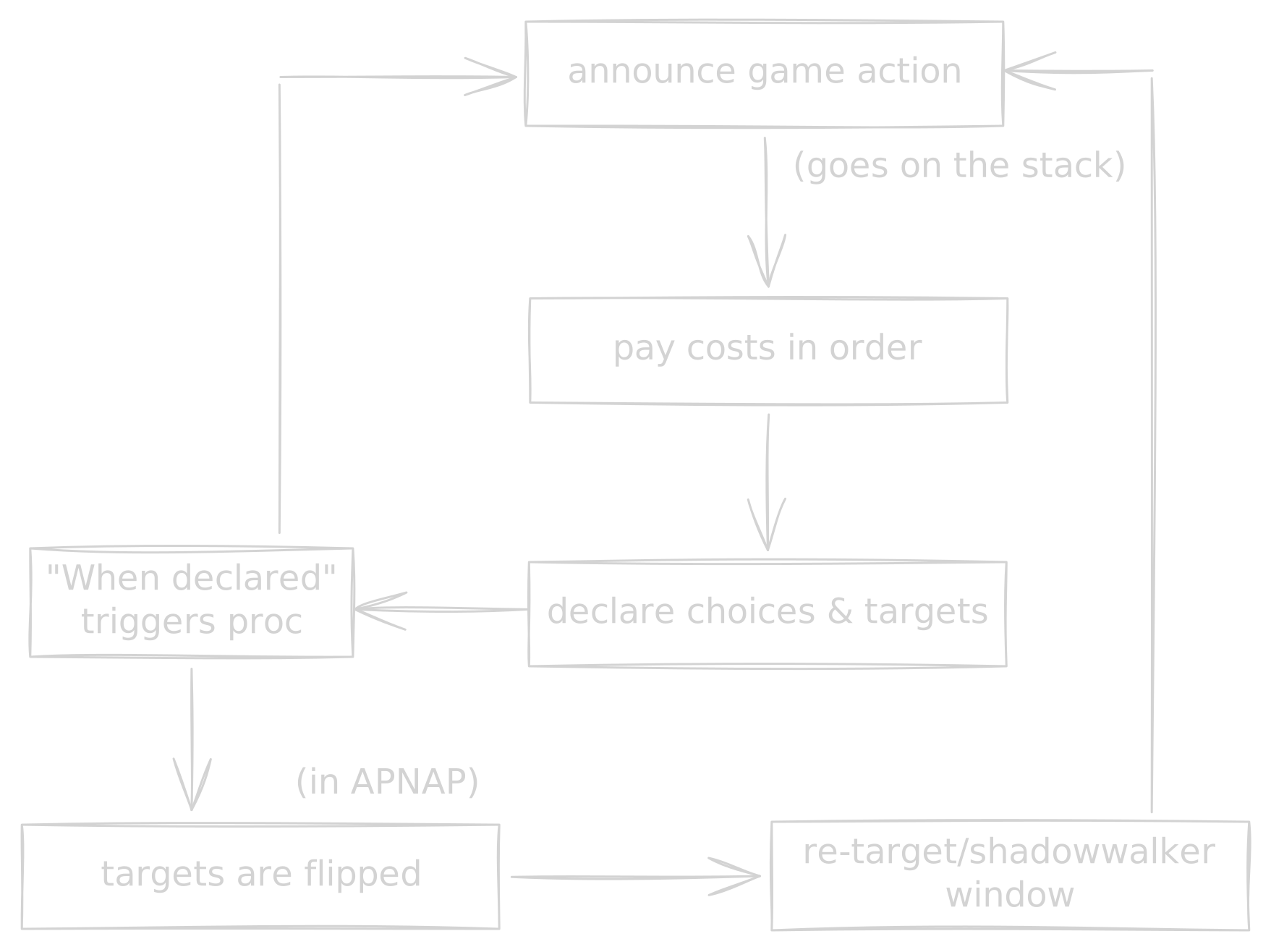
Then the Stack starts to resolve in backwards order. Each single Effect resolution cannot be interrupted; triggers just go to the Stack after that. However, as stated, the Stack does not need to be empty for effects to be added to it.
Triggers always go into the Stack as soon as they proc and the current effect finishes resolving (regardless of optionality); first the current player's turn triggers, and then the opponent's. Each player can order their triggers as desired.
After triggers each player gets to add as many Activation effects as desired, using the priority system, starting with the turn's player.
Targeting
Targeting is a unique part of Dimensional Rift because you cannot just choose any card on the field. You actually target zones, not cards, and you must use the card's arrows to determine what other zones it can "reach".
When a card says "target creature" or "target card" it is just shorthand meaning "target non-empty creature zone" or "target non-empty zone". Whichever card is in the targeted zone at time of resolution will be the target of the effect. Targets must be valid both at time of activation and also at time of resolution. So, for example, for a "target creature" effect, there must be a creature on the target zone at time of activation and also at the resolution time. If there is no longer a creature in the zone, the effect fizzles. If the source card moves, rotates, or has its arrows changed in between activation and resolution, the target zone must still be connected during resolution, or the effect fizzles.
Inactive zones can still be targeted if there is a valid card in it (unless otherwise specified). For example, if a creature with Explorer moves to a inactive zone, it can still be targeted by a "Target creature" effect.
Note that Monuments do not participate in the targeting system. Monuments cannot have arrows and cannot be orientated other than straight up. They also cannot ever be face-down. Monument zones are not part of the targeting grid, not being adjacent or connected to any other zones.
Implicit targeting
Targeting must always be done during activation, following the declaration lifecycle; however, it might not be specified in the Activation Criteria text (before :).
In fact, the mere presence of the word "target" in any part of the effect is an implicit shorthand to call out that this card requires targeting during activation.
For example, if an effect were to read:
When summoned: deal 1 damage to target creature.
The use of the word "target" here in the Resolution Instructions implies a short hand for:
When summoned; target a creature: deal 1 damage to target.
Sometimes the targeting will be specified in the Activation Criteria to avoid ambiguity or to facilitate the specification of extra parameters and requirements; sometimes it will only be mentioned on the Resolution Instructions to simplify the wording of the effect. Either way, there is no mechanical difference.
Arrows
Unlike in other TCGs, where normally any card matching the targeting requirement can be selected, in Dimensional Rift "target" always mean "arrow targeting", meaning that the target must be reachable from the targeting card using its arrows and current orientation on the field.
Every card has either none, single, double arrows on each of the 8 directions (top, bottom, left, right, and diagonals) - though double diagonal arrows do not exist. Face-up non-monument cards while on the field can be oriented in any of their four 90-degree possible rotations. The orientation of a card must be picked by the player upon summoning it, and cannot be changed arbitrarily (but can be changed by move or rotation effects).
Cards cannot be oriented on non-90-degree angles, and thus orthogonal arrows are always orthogonal and diagonal arrows are always diagonal.
You can only target cards the targeting card connects to.
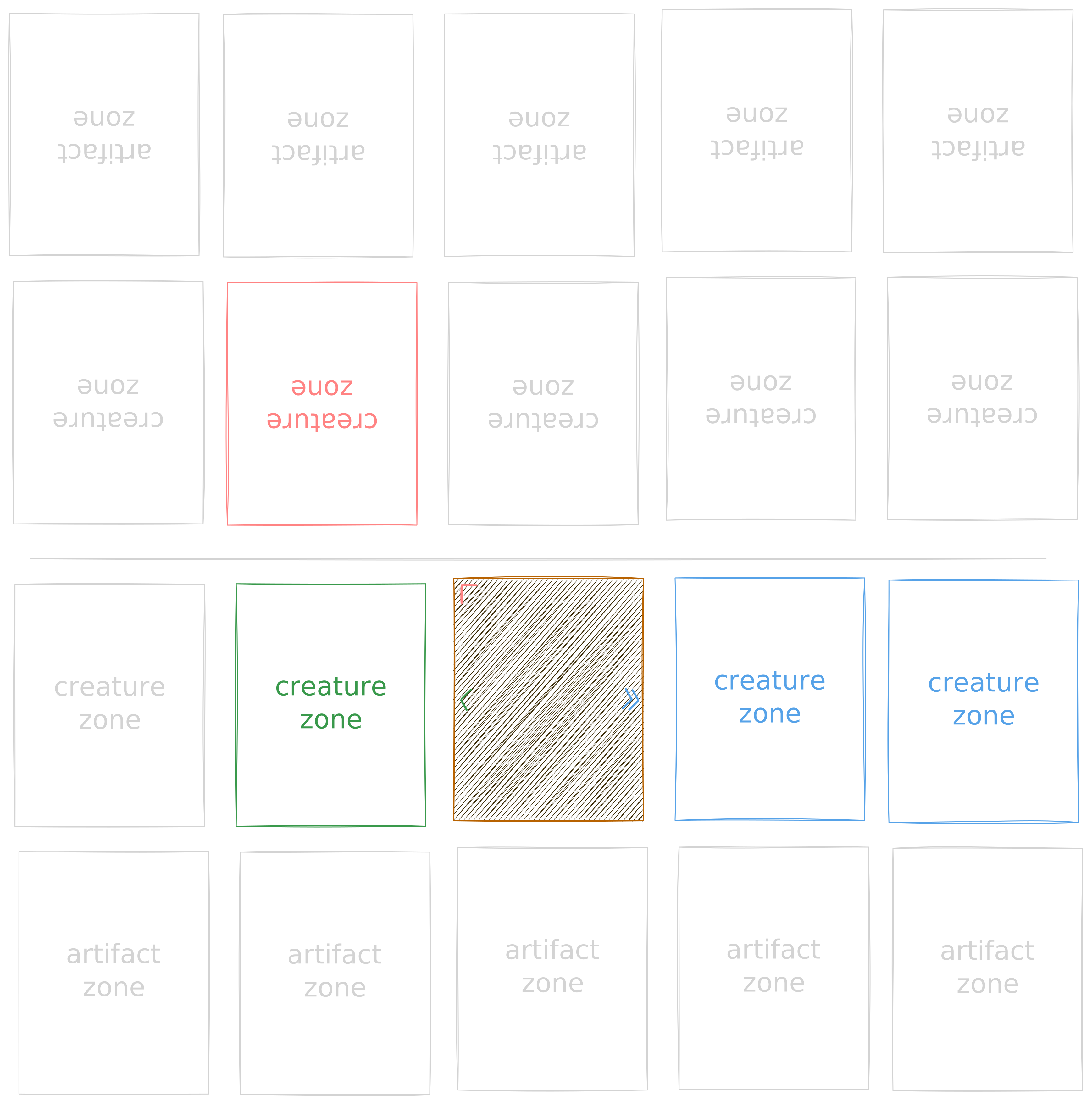
A single orthogonal arrow connects to the next zone on the row/column it points to; a double orthogonal arrows connects to all zones in its direction.
A diagonal arrow connects the zone in the next row and next column where it points to. There are no double diagonal arrows.
Below are some image examples to make it more clear, plus there is an interactive Target Practice app.
Interactive Target Practice
↖
↑
↗
←
·
→
↙
↓
↘
Choosing
The word "choose" also has special meanings in effects, depending on what kind of "choosing" is being done.
Some effects, typically from Monuments, might allow you to "choose" cards or zones. This essentially works exactly like targeting but with no arrow requirements (so like targeting is in other games). You can choose any card or zone according to the specified requirements, and must do so at the targeting phase (even if the word choose is at the Resolution Instructions).
A card might also require you to "choose either", followed by options identified by numbers in parenthesis, (1) and (2). Whether this must be done at time of Activation or Resolution depends on where in the effect the word "choose" or "either" resides. If any of them is on the Activation Criteria, then the choice must be made upon activation as part of Targeting.
Finally, an effect might contain a variable X, often to represent either a value to be determined or calculated based on the current game state or to be "chosen" by the player. Either way, that must be done upon Activation.
Connected
A card is considered Connected to another card if it has arrows that connect to that card. That does not mean target; instead it refers to all cards or zones that this card could target.
Some effects might affect "all connected face-up cards". This does not require targeting. The affected cards are determined upon resolution.